Security and privacy findings you can prove.
One scan checks vulnerabilities, OWASP Top 10, TLS, email, trackers, consent and Global Privacy Control. Every finding comes with the evidence behind it.
No credit card. Only scan sites you own or have permission to test.
Trusted by teams at
- BioMD
- RespoCare
- ThinkOfThem
- Pictogene
- Probalythic
- HelixCap
- NovaCore Group LTD
By combining OnScanner with manual pentesting, we identified and fixed a critical vulnerability that had been present for months.
See OnScanner in 76 seconds
Security, privacy, compliance, AI Findings and monitoring in one 1:16 tour, from one scan to the report you share.
Read the transcript
Every website tells two stories. The one you publish, and the one an attacker, or a regulator, can see. OnScanner shows you both, with findings you can prove. Point it at your domain. Specialist engines run in parallel, signed out, or behind your login. Security. OWASP Top 10, API checks, and CVEs on your real stack, with safe exploit checks that confirm what is actually exploitable. Privacy. A real browser records every tracker, pixel, and cookie. Then it tests whether your consent banner and Global Privacy Control are really honored. Compliance. Scan evidence, mapped to controls across seven frameworks, from SOC 2 and ISO 27001, to GDPR. AI Findings. A plain-language summary, attack chains, and a MITRE ATT&CK kill chain. Then keep watch. Monitoring re-scans on a schedule, and alerts you when something changes. Connect your AI agent over MCP, gate every release, and share a clean PDF report. Evidence. Not guesses. OnScanner. Security and privacy findings you can prove. onscanner.com.
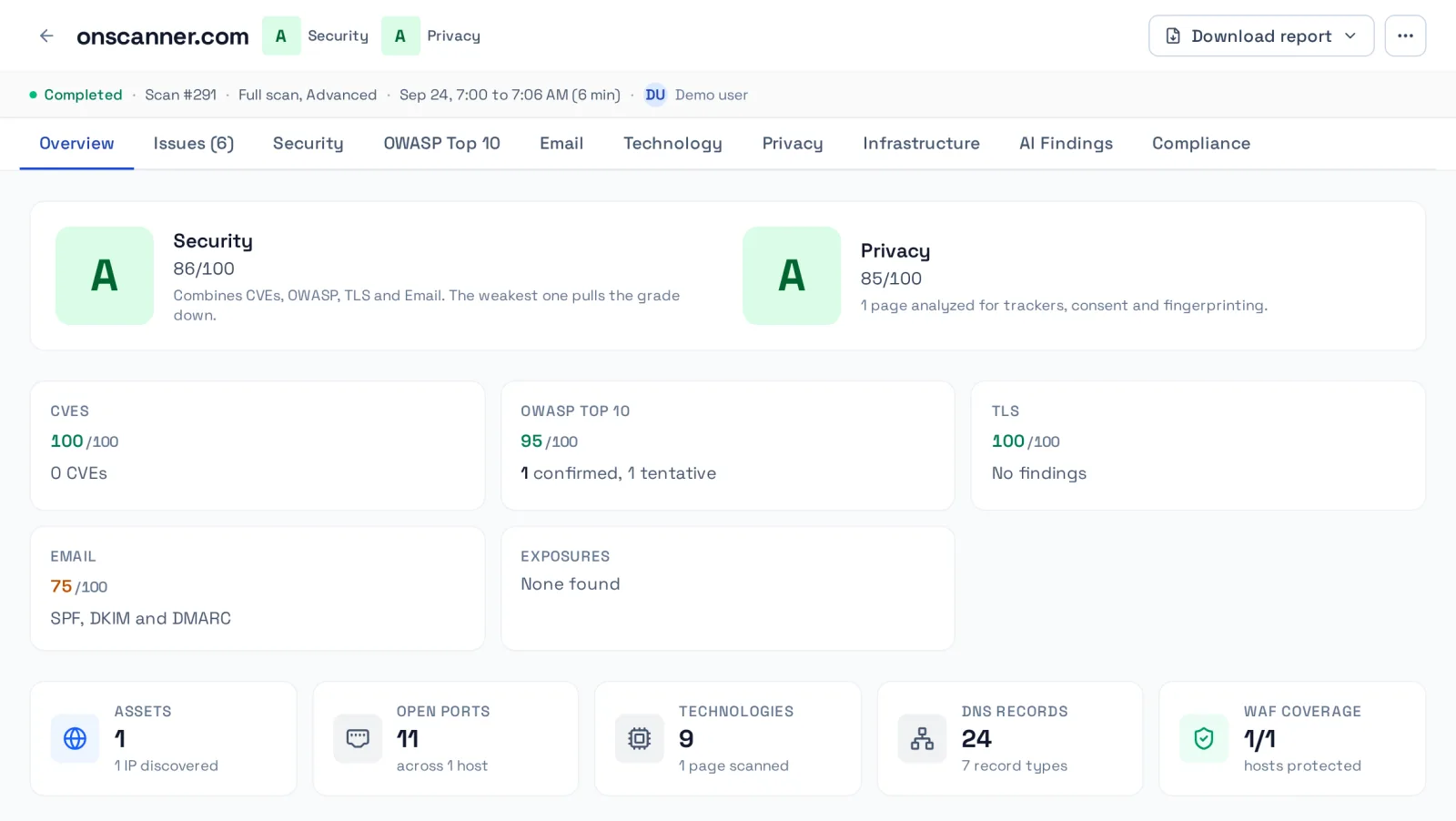
What one scan covers
Point OnScanner at a domain you own. Specialist engines run in parallel, unauthenticated or behind a login, and report back in one place. Most scans finish in minutes.
Security
OWASP Top 10 and API checks, CVEs on your detected stack with EPSS and KEV context, and optional safe exploit checks.
Privacy
A real browser records trackers, pixels, fingerprinting and cookies across 40+ categories, then tests consent and GPC.
SPF, DKIM and DMARC alignment. A domain that sends no mail is not marked down.
TLS
Protocols from SSLv3 to TLS 1.3, weak cipher probes and certificate checks.
Technology and end of life
Product and version fingerprinting, with a flag for versions past or near end of life.
Exposures
Open ports, exposed files and paths, WAF detection and optional subdomain discovery.
Consent and Global Privacy Control checks run in advanced and deep modes. Exploit verification (+1 credit, included in Deep) and subdomain discovery (+2 to +10 credits, by the number of hosts you pick (10, 25, 50 or 100)) are options you pick per scan.
Sample report
Evidence, not guesses
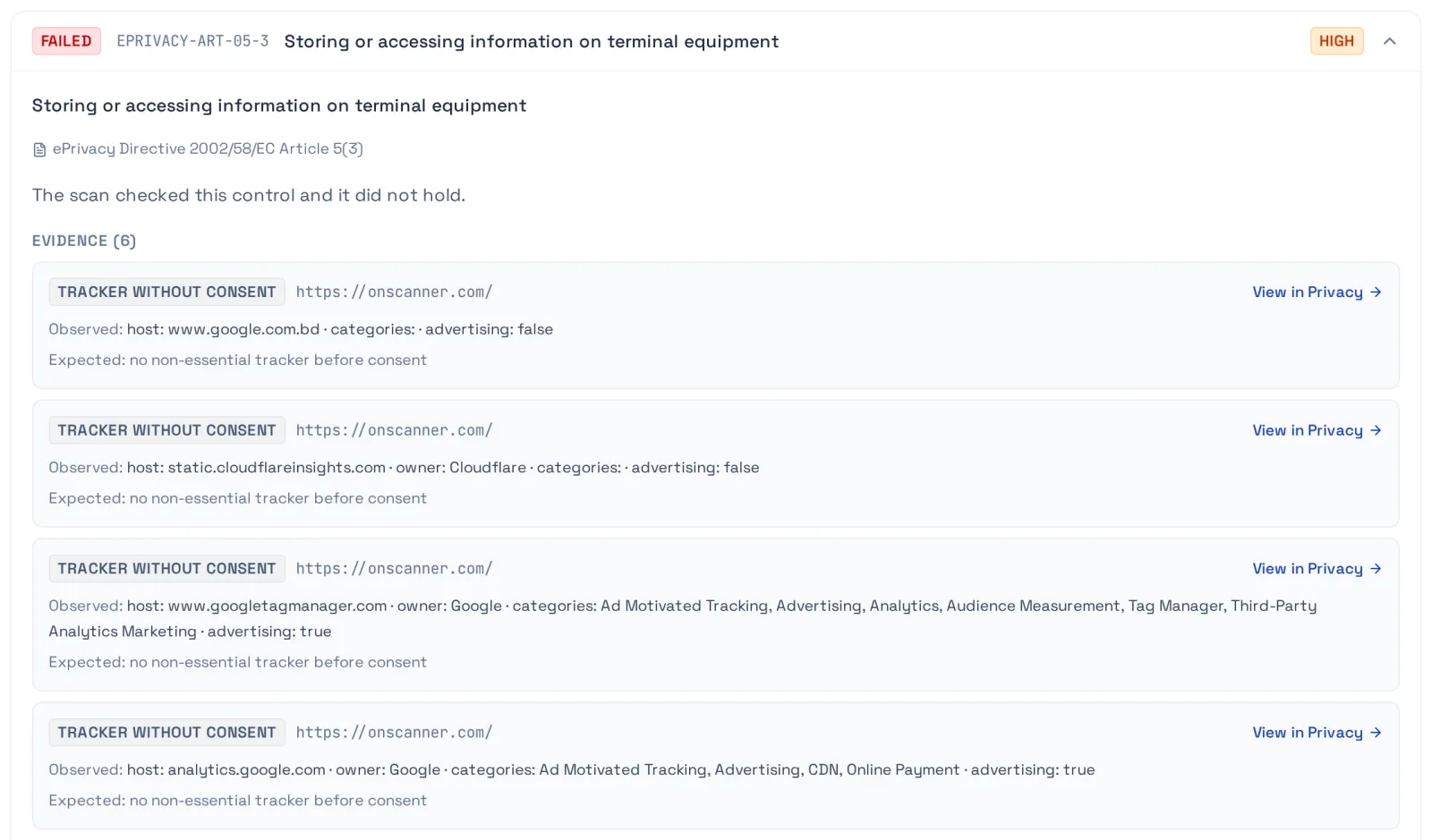
Each finding shows what was observed, where, and what was expected, so you can check it yourself.
- Deterministic engines. No model decides whether a finding exists.
- Confirmed and tentative findings are labeled apart, and a tentative one can never fail a control.
- Exploit checks verify in-band from the response body, status or timing. No out-of-band callbacks, nothing destructive.
- We tune every engine against false positives. When a check cannot prove a finding, it says so.
Compliance evidence
Scan evidence, mapped to controls
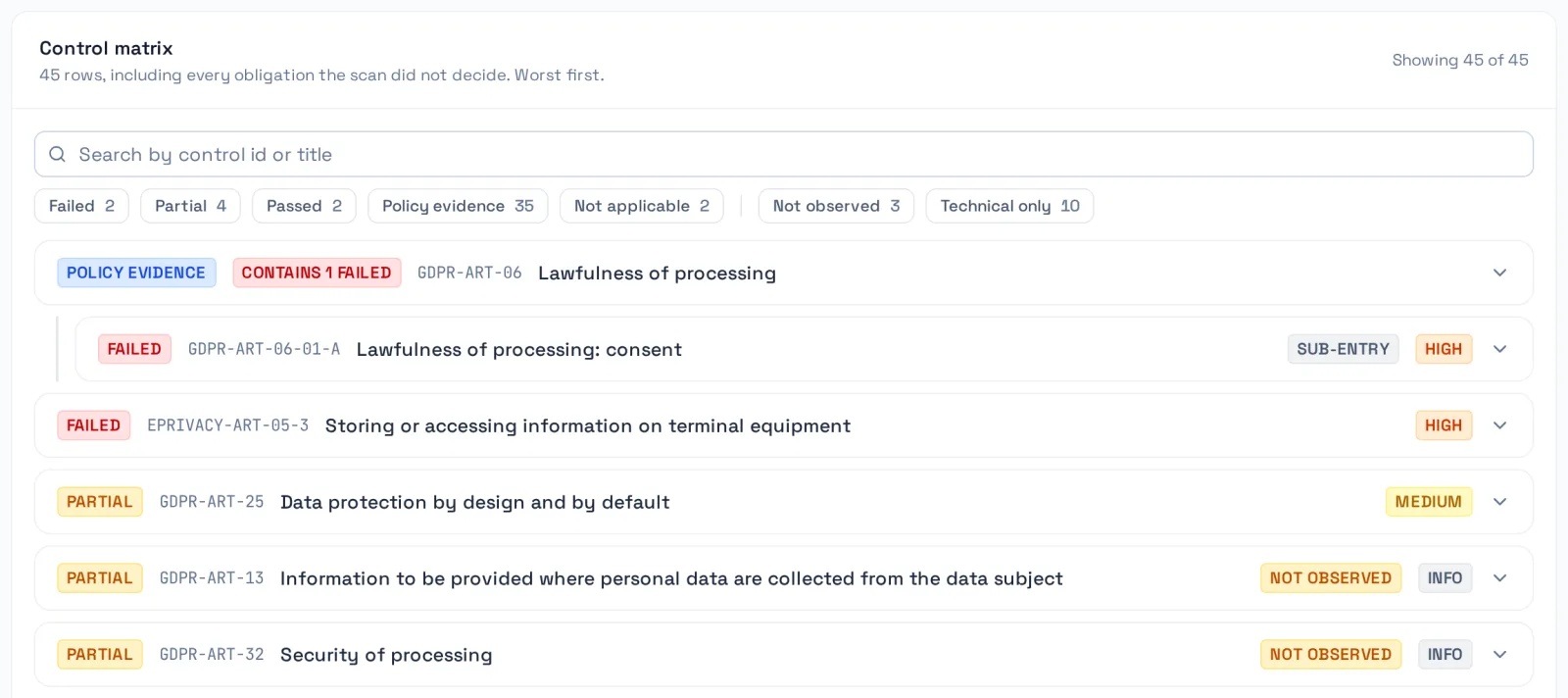
OnScanner maps what the scan observed to controls in seven frameworks. Each control gets PASS, PARTIAL or FAIL with the evidence behind it, or is listed as needing your own evidence. Verdicts are decided by versioned rules, at the time of the scan.
Coverage, stated honestly
An external scan can check 25 of 229 controls across the seven frameworks. The other 204 need policies, training or other evidence only you have, and the report names every one of them.
- An auditor evidence binder PDF with the control table, the evidence appendix and the scope statement.
- Evidence for your compliance work, not a certification, an audit or legal advice.
- +1 credit per scan, flat, for every framework you pick. An account owner or admin turns compliance reporting on in account settings.
Privacy
Consent and Global Privacy Control, verified
Your banner says no. Does your site listen? OnScanner tests it in a real browser.
- Clicks Reject all and Accept all, then compares the trackers and cookies each run loads.
- Sends the Global Privacy Control signal and shows which trackers kept loading.
- Reads Google Consent Mode pings, so a denied, identifier-free ping is not counted as tracking.
- Finds your privacy policy and flags third parties it observed but the policy does not name.
Need it for counsel or a DPO?
The Consent Verification Report is a one-off audit of one domain for $199, delivered as a dated PDF in two business days. No credits or subscription.
See what is in the report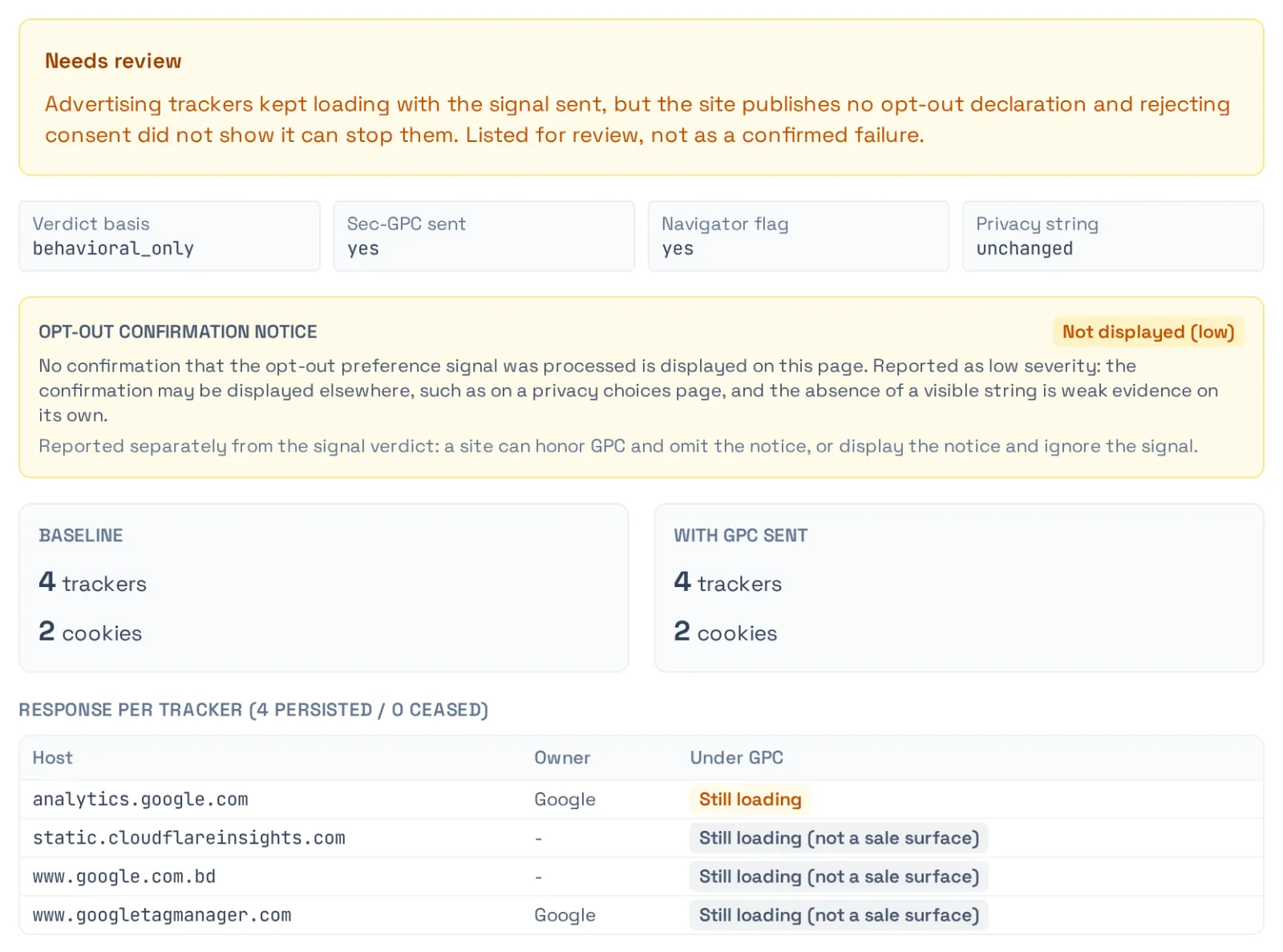
Optional
AI Findings, an optional layer
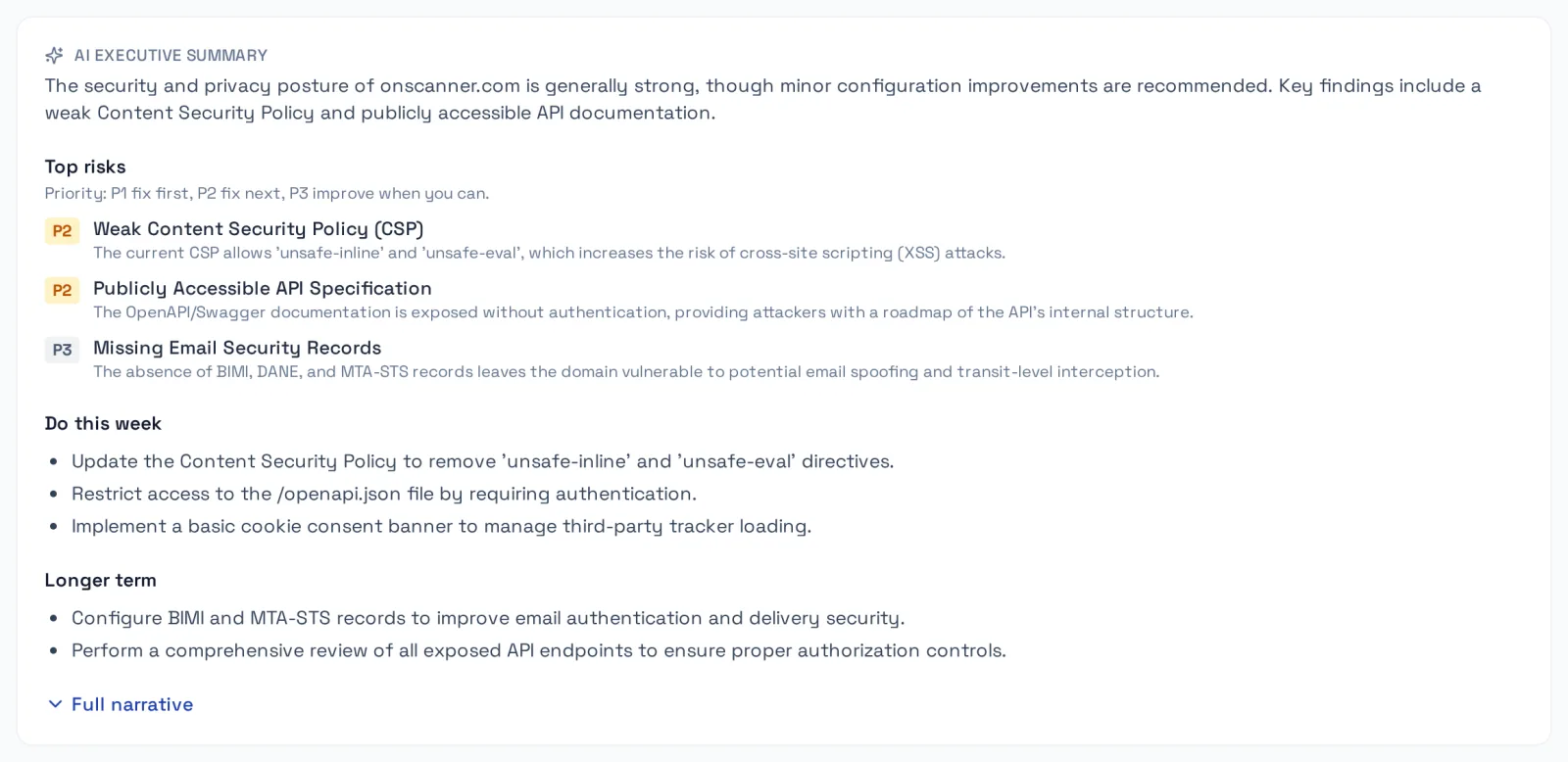
Turn it on per scan. It is included at no extra credit. It reads the results the scanner recorded and explains them.
- An executive summary with ranked risks and what to do first.
- Attack chains that link related findings, and a MITRE ATT&CK kill chain.
- What changed since your last scan of the same target.
- Grounded in your scan: it cannot invent a finding or lower a severity.
The scan engines never call an LLM. AI Findings (included) sends the scan's findings to the hosted AI provider to write the summary, the prioritized risks and the attack-chain analysis. Selecting compliance analysis also sends the rule engine's verdict matrix to the hosted AI provider for the plain-language narrative, and the narrative never changes a verdict. With both off, nothing is sent to an AI provider. An account owner or admin turns AI Findings on in account settings.
For AI agents
Scan from your AI agent, gate your releases
Connect Claude, Cursor or any MCP client to the OnScanner MCP server. Your agent can start scans and read findings and the compliance matrix, with your API key and the same rules as the web app.
Deployment gate
verify_deployment scans a preview or staging deployment and compares it with a baseline scan of production: security headers, TLS, exposed paths, trackers and OWASP finding families. The verdict is pass, regressed or inconclusive, and inconclusive is never a pass. Call it through MCP, or from your own pipeline through the REST API.
claude mcp add onscanner \
  --transport http https://mcp.onscanner.com/mcp \
  --header "ONSCANNER-KEY: <your-key>"

# then, in your agent:
"Scan staging and tell me if it regressed against production."
Pay per scan, in credits
One credit buys one security or privacy scan of one target. A full scan (both) is 2 credits. Advanced mode adds 1 and deep mode adds 2.
Optional add-ons: AI Findings, included on every scan, and compliance evidence at +1 credit per scan, flat, for every framework you pick. An account owner or admin turns them on in account settings, and only the scans that use one are charged for it.
Free
$0/month
- 5 free scan credits at signup
- Topped up to 2 free credits every 30 days
- Pay-as-you-go: $12/credit
- Credits expire on a rolling 30-day window
- Regular queue, email support
Most popular
Pro
$129/month
or $1,290 a year, two months free
$1,290/year
$107.50 a month, billed yearly. Credits still arrive monthly.
- Includes 20 monthly scan credits (up to 20 roll over)
- Pay-as-you-go beyond credits ($6/credit)
- 3 monitored sites with a free weekly scan
- Change alert emails on your monitors
- Up to 5 team members
- Priority queue, support tickets
Business
$349/month
or $3,490 a year, two months free
$3,490/year
$290.83 a month, billed yearly. Credits still arrive monthly.
- Includes 80 monthly scan credits (up to 80 roll over)
- Pay-as-you-go beyond credits ($5/credit)
- 10 monitored sites with a free weekly scan
- Change alert emails on your monitors
- Unlimited team members
- White-label reports and client sub-accounts (set up with support)
- Highest priority queue, support tickets
Enterprise
Custom
Yearly contracts are quoted by our team
- Minimum 100 scan credits/month
- Every monitored site with a free weekly scan
- Change alert emails on your monitors
- Pay-as-you-go beyond credits ($5/credit)
- Unlimited team members
- White-label reports and client sub-accounts (set up with support)
- Highest priority queue, dedicated account manager
Every plan includes
- All scan types (Security, Privacy and Full)
- All scan modes (Quick, Advanced and Deep)
- Unlimited targets (each scan uses credits)
- Subdomain scans of up to 10 hosts, 25 on Pro, 50 on Business or 100 on Enterprise
- Exploit verification (+1 credit per scan, included in Deep)
- AI Findings on every scan, at no extra credit
- Scheduled scans and monitoring
- PDF reports
- REST API & MCP access
Not buying credits? The Consent Verification Report is $199 per domain, one off.
How we test, in the open
What each engine does, what it does not test, and how we keep probes safe. Read it before you trust a result.
Frequently asked questions
Run one scan and see the evidence
Start on the free plan. Most scans finish in minutes.
No credit card. Only scan sites you own or have permission to test.
Prefer to talk first?
Questions about Enterprise, compliance or the consent report. We reply by email.